Page 1 of 1
Factory Reset option missing from Isaac Software
Posted: Sat Jul 15, 2017 11:14 pm
by jpkim921
hi,
I recently started to ride again and wanted to use my powerpod again. But when i tried to reset the device i could not find the reset device option. i attached an image to show what I see on my screen. Did it move somewhere else?
Thanks for any help available.
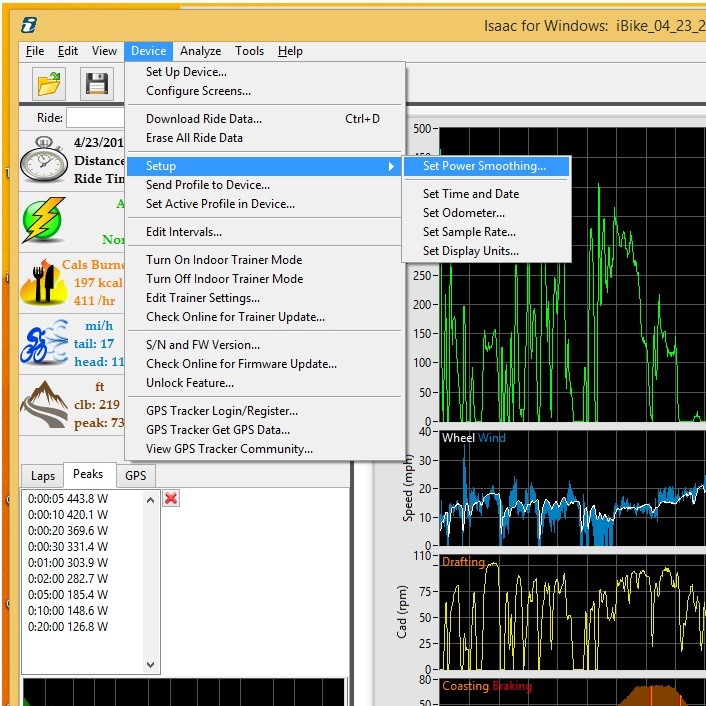
- isaac-powerpod-screenshot-missing_reset .jpg (173.05 KiB) Viewed 4453 times
Re: Factory Reset option missing from Isaac Software
Posted: Sun Jul 16, 2017 7:34 am
by Velocomp
This is a stumper.
The "Device/Setup/Reset Profile-Device..." command is most definitely there. I confirmed this both on Mac and Windows versions.
I note also that you are missing another command from the same menu
I suggest you try reinstalling Isaac.
Re: Factory Reset option missing from Isaac Software
Posted: Tue Jul 18, 2017 10:25 pm
by jpkim921
Hi,
Thanks for replying. I reinstalled and it only works under the admin account and not the normal account i use. Glad it works and I can reset it now. Can't wait to use it. Thanks again. Really appreciate it.
Re: Factory Reset option missing from Isaac Software
Posted: Sun Apr 14, 2019 7:44 am
by kevindearden
I would imagine that this has been solved a while ago but I recently experienced the same problem but found out what was the cause. The way to solve this problem was to select Edit/Preferences/Menu To Show - and select advanced. This reveals all the reset options in the Device/Setup menu. Hope this may help someone, even if it is a while after the original event.
Re: Factory Reset option missing from Isaac Software
Posted: Sun Apr 14, 2019 7:46 am
by Velocomp
That is a great catch...thanks for sharing!